Pages

Wednesday, 27 April 2011

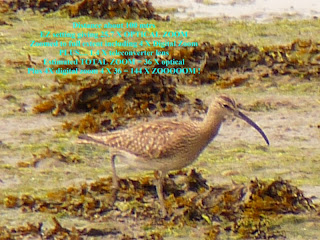
144 X ZoooooOOOOOOOm on the Panasonic FZ28


OK... sounds rediculous I know.... but I have this "thing" about getting as much zoooooom as I can from what I have available... today, we went to Farlington Marshes, and I spotted something moving about 300 feet (100 mtrs) away... so I made sure I had my 1.4 teleconverter lens fitted (see earlier postings about this).... and also reduced the MPX count on my FZ28, to make the maximum OPTICAL ZOOM read 25.7 on the sliding scale. I then found a convenient seat, and firmly rested (as best I could) my camera on the back of it, and zoomed in on the subject..... I then went the "whole hog", and added in the 4 X digital zoom ... doing the maths, it works like this.... 25.7 Optical Zoom multiply by 1.4 teleconverter lens gives 35.98 (call it 36 X OPTICAL ZOOM)... then add on 4 X DIGITAL ZOOM....(36 X 4 ) to give a massive 144 X ZOOOOM..... OK so it is a "bit" noisy, but it is not too bad considering the size of the sensor, and the fact that the 1.4 teleconverter lens is not actually made for the FZ28.... ( It is a Sigma VIDEO CAMERA accessory lens)...

Friday, 15 April 2011

Wagsy`s Lake pics


This is the ORIGINAL, as sent to me...  CLICK ON THE PIC TO ENLARGE IT

Here is my "improvement" using Irfanview.


CLICK ON THE PIC TO ENLARGE IT !

Open Irfanview. Go to "Image" (top tool bar )  Drop down menu
 click on "Auto Adjust Colours"..... wait....then click on "Image"
Colour Corrections... opens a new window with two pics side by side...
Left side is original, Right side is the "adjusted" pic.
 move "Contrast" slider to + 10 ...... and "Gamma" slider to 0.65
And if you think it needs it.... Saturation to  + 50 click OK and
then Save... (save it in the original folder with A after the file name/number to show it is Adjusted., )

and there you go !... Let me know when you have seen it, and I will remove this from the blog .

Tuesday, 15 March 2011

Cloning using Photo Pos Pro - FREE & Easy to use Photoshop Alternative !

Esmeralda put this pic on Flickr, from her trip to Mexico or somewhere forren!... and she complained that something was missing from the bottom right corner... I suggested a crop, or cloning some foliage... she did not want to crop any further, and does not know how (easy it is) to clone, especially with Photo Pos Pro. which is similar in layout and functionality to Photoshop...

Here is her original ....

and this is the "clone" version....


So.... how easy is it....

How to “clone” using  PhotoPosPro

First….. Download and install Photo Pos Pro. From here…..

http://download.cnet.com/Photo-Pos-Pro/3000-2192-10264444.html?part=dl-PhotoPosP&subj=dl&tag=button

Once installed. It looks pretty much like Photo shop…

File > Open (find the pic you want to work on, and “open” it)…

On the left hand margin….. Select the “clone brush”… (10th icon from the top)

(You can select the "size" and shape of the brush on the small drop down box on the right of the workspace)

Move cursor across the pic to a suitable starting point for cloning…. Then Right Click on the start point….

Now move the cursor to where you want the “clone” to appear,  Left click and hold, and move the cursor about and watch the “clone” appear…

You can see where the clone is coming from, by watching the “original” right click position…

Easy Innit! ! ! …

Friday, 26 November 2010

another Irfanview example


Once again... "improved" with Irfanview... FREE program... ask me for details and my free tutorial !..

Reduced Gamma to 90
increased contrast to 6
then cropped.
then saved.

Tuesday, 9 November 2010

Using Irfanview, to "improve" a pic

Two clicks and the difference is quite remarkable...

1st, move the "Gamma" slider to .60

2nd move the "contrast" slider to 6

click OK

then save....... job done.!.


I will delete this posting as soon as you say you have seen it....

Saturday, 6 November 2010

In Car Entertainment


This is my new "toy"... MP4 player, with camera, digi movi cam, FM radio, webcam, games, and loads of other stuff !... I bought it from "BT Shop"... especially to play my Helene Fischer videos!... (I do have others on there too! !)..when I am waiting for " `er indoors " to come out of the supermarket with a trolley load  !..

I do not drive the car, with this setup!... it is all tucked away, out of sight, when driving...

The speakers were bought seperately, and are powered by a small battery pack (4 x AAA)

The sound quality is really very good, as good as my external computer speakers, and as good as my "proper" earphones...  Certainly makes a change from the boring stuff on Radio 4..... !

Sunday, 12 September 2010

The Watercress Line .... or Mid Hants Preserved Railway.

Watercress Line..... or Mid Hants Railway.....

http://www.watercressline.co.uk/Home

http://www.watercressline.co.uk/Events


Either way, it is a super little preserved line, that runs from Alresford to Alton in Hampshire, southern England.....The line is known to the engine drivers and fireman as "over the alps", because it has some very steep gradients in the climb, therefore it needs BIG engines to haul the rake of coaches .... There are several BIG steam loco`s at the shed, and they usually take it in turn to steam on the weekends.... This last weekend saw the introduction to the fleet of an engine that has been re-built and refurbished, since it last steamed over 45 years ago.... the engine is a Stanier Black Five... general purpose loco, number 45379. Also on duty this weekend, was a Serbian built 0-6-0 tank engine, that had been bought and repainted in BR colours / logo , 30075, doing a shuttle service between Ropley, and Alresford, with an observation car in tow, while the "big boys" got on with providing passenger and goods services every half hour.... The other big boys on duty were 34007 Bullied Pacific "Wadebridge" ....  Number 88 on a visit from the Somerset and Dorset joint railway... .... 73096  BR standard Class 5 loco, and 92212 a Class 9F loco.....


There was so much going on, with engines being changed over, and the different services provided, that it was, without doubt, a very successful weekend for the staff..... Re-creating the whole atmosphere of how it used to be when I was a boy ..... way back in the 1950`s.....